Navigation

Introducing new features added to next version of Chameleon, part 1.

Home » Articles » Introducing new features added to next version of Chameleon, part 1.
Article is filed in
Posted 3. February 2009


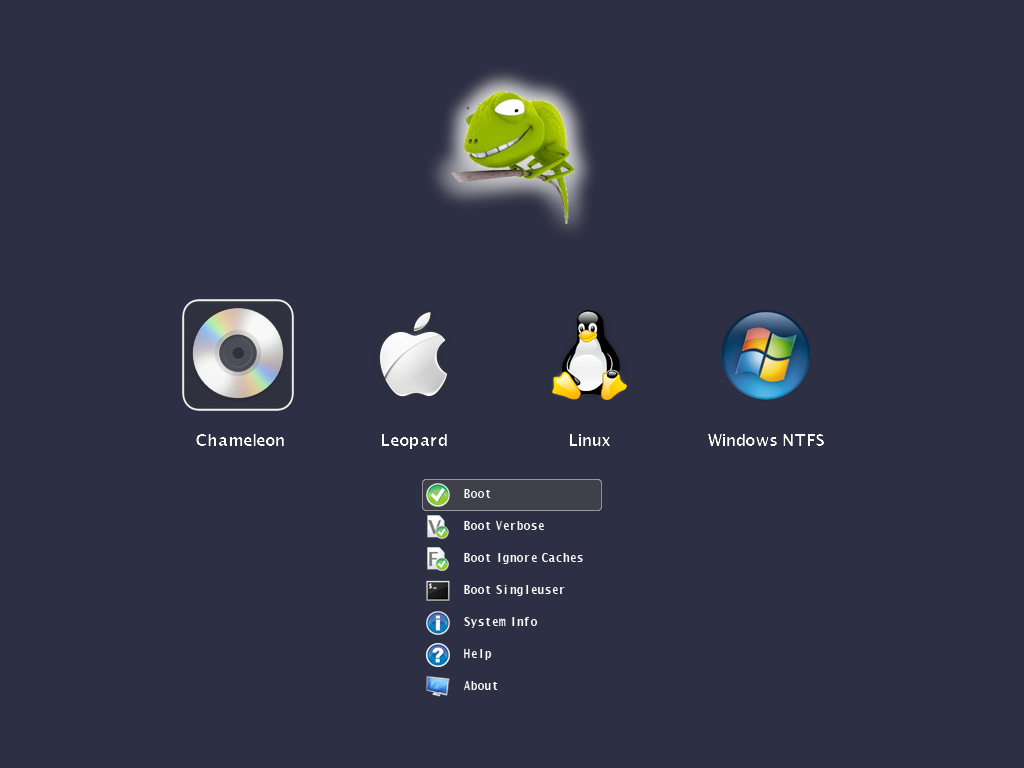
Finally, we’re getting there. I have no doubts about the most demanding feature is should be a graphical user interface for the boot loader. We have reached to a stage where I can show you something really cool. Yes, we have a fully customizable GUI.


Article is written by Tamás KOSÁRSZKY.

How do you mean customizable?

You can replace all the images, the icons, the funny chameleon artwork, the fonts. Also you can set the background color, the transparency levels, the dimensons, positions of certain user interface elements. The image resource files can be either embedded into the booter or can be loaded at runtime by using a special .plist style configuration file.

Doesn’t embedding the images makes the boot loader too large?

With the current set of icons, images, fonts embedded, the booter size is about 300k. Without embedding the resources you will get about a 110k large booter. The maximum size of the booter is 392704 bytes (383.5k).

What image formats are supported?

The booter has built-in support for true color 24 bit PNG images with 8 bit transparency layer. We wanted to offer a high quality lossless image format which can be created, edited with many graphics applications across all platforms.

What if I still prefer the text mode interface?

We can’t switch between text mode and graphical mode at the moment after the booter has been started, but you still have a Boot.plist option to disable the GUI. This way you get the well known text based Darwin boot menu.

Ok, this is all fine. Can I see something?

Sure! Click below on the pictures in the gallery to see these shots in full size.

Can I have it now?

No. Please don’t ask for it as you will get it when it’s released.

What’s next? Do i have to wait for next christmas ;-)?

We’re still fighting with issues and polishing the code but freezed the features. So instead of staying quiet, we’re going to reveal other features in the next post on this week.

Image gallery:


Share this!


Comments

  1. joe75 · 3. February 2009, 17:20 · #

    looks great guys, cant wait! :)

  2. PolishOX · 3. February 2009, 17:32 · #

    Chameleon is what dreams are made of…

  3. sonotone · 3. February 2009, 18:13 · #

    “Chameleon is what dreams are made of…”
    Oh yes, and more!

  4. Trauma! · 3. February 2009, 18:44 · #

    That’s really really cool ! Thanks a lot for this preview.

    This graphical interface is really nice.
    Is it possible to have 16:10 video modes ?

  5. zef · 3. February 2009, 18:51 · #

    @Trauma!:

    It depends on your video card’s VESA extension. For example my 8800GT can be switched to 1680×1050×32bpp.

  6. DR. HURT · 3. February 2009, 19:02 · #

    Absolutely Gorgeous, I can’t wait to use it!!
    This reminds me of rEFIt and Boot Camp. Can you add gptsync too. It would be very helpful to so many people because it would allow installation of windows on GPT because even vista sp 1 ×64 tells me “cannot install on GPT partition style” :(

    Thank you VERY VERY much for finally briefing us on the status of the new boot loader. Looking forward to knowing about the other non-graphical features of the boot loader.

  7. iNDi · 3. February 2009, 19:38 · #

    @DR. HURT.

    Partition your hard disk using disk utility selecting GPT scheme and add an ms-dos (fat) partition a hybrid gpt/mbr disc is created.

    Windows will then see this disk as MBR and OS X will see it as GPT. This is style BootCamp uses.

  8. rockstarjoe · 3. February 2009, 19:57 · #

    Congratulations on your awesome achievement with this! I am so excited for this release! I know you have all put a lot of hard work into it and I am very happy that you took the time to post teaser shots and release a bit of info finally ;)

    Will this release support booting from the EFI partition of a GPT disk (aka the “Munky Method”)? This is how I am currently booting with Chameleon.

    Thanks again for everything!

  9. iNDi · 3. February 2009, 20:13 · #

    @ROCKSTAR

    yes. :)

  10. DR. HURT · 3. February 2009, 20:45 · #

    I want gptsync so that I can sync the GPT with MBR so if I ever mess it up with gparted or if it gets messed up for any other reason I can fix it. Adding it would still be very useful for many people who dual boot and like to experiment like me. Thanks in advance.

  11. rockstarjoe · 3. February 2009, 21:26 · #

    Thanks Indi! A follow up question (stop me if I’m asking too much or making you give away any surprises…)

    If this version of Chameleon allows you to select from many partitions across multiple disks, does that mean it will be possible to place Chameleon on a USB stick and use it to boot a hard drive? THIS has been my ultimate dream! :)

  12. zef · 3. February 2009, 22:04 · #

    @rockstarjoe:

    Yep, you can :)

  13. CHOPPER · 3. February 2009, 23:29 · #

    Hey Great news cant wait.

    1 question ZEF will this boot snow leopard obviously when its released?

  14. Trauma · 3. February 2009, 23:53 · #

    @ZEF & INDI : Simply wonderful !!! You rocks guys !!!

    I can already imagine how many nice features you’ve putted
    into that great boot-loader !!!

    Thanks again to all the team. ;)

  15. triple675 · 4. February 2009, 00:43 · #

    I’ve been checking everyday to read some news about the progress. Thanks for the update! I was hoping for a solution similar to refit for osx86, but you guys have done that and much more. Can’t wait for the beta or alpha and start testing.

  16. xkelly · 4. February 2009, 01:14 · #

    that. is pretty freakin awesome!

  17. theStevo · 4. February 2009, 04:40 · #

    Thanks for your continued work. Looks great, and looking forward to it!

  18. Zigtown · 4. February 2009, 06:19 · #

    Amazing guys can’t wait to give er a go!:D

  19. Stellarola · 4. February 2009, 07:06 · #

    This is probably the sexiest thing I’ve ever seen in my life. Well not really, but damn close!

  20. 3Dman · 4. February 2009, 07:13 · #

    That’s nice progress :)
    Good luck.

  21. Rhyguy · 4. February 2009, 09:16 · #

    CUS
    TOM
    IZE
    ABLE?

    OMFG!!!!!!!!!!!!!!!!!!!!!!

    !!!!!!!!!!!!

    yey:)

    only thing is though, are we able to change the grey screen background and the loading thing color?

  22. RHYGUY (AGAIN) · 4. February 2009, 11:16 · #

    WILL WE BE ABLE TO CHANGE THE GRAPHICAL BOOT MENU’S RESOLUTION?

  23. zef · 4. February 2009, 12:27 · #

    @RHYGUY:

    Yeah, you the booter will use the “Graphics Mode” settings specificed in com.apple.Boot.plist. You can get the supported modes by running the “?video” command at the boot prompt.

  24. caine · 4. February 2009, 14:14 · #

    Well done! Chameleon’s got graphics and multiboot support:). What about other features? Is there an extended efi and acpi tables like in DUET?

  25. Daniel · 4. February 2009, 14:16 · #

    Amazing work. Simply amazing. As everybody else I cant wait to install this new version. You guys are trully the souls of our little community.

    Cheers

  26. mackerintel · 4. February 2009, 14:30 · #

    @caine: What do you mean by acpi tables? And EFI stub was never intended to be anything more than a stub necessary to boot unmodified kernel

  27. Black · 4. February 2009, 15:23 · #

    Congrats, amazing job! You guys are the best!
    Looking 4ward to it!

  28. Hagar · 4. February 2009, 15:50 · #

    Very, very pretty, but beauty is more than skin deep.. I can’t help myself.. gotta ask… any sign of atapi support for booting dvds from non-optical media? Is that what hides behind the cdrom icon?

  29. Azimutz · 4. February 2009, 16:27 · #

    Niiiiiice.. news at last :)
    Very nice work guys.. it’s really a teaser!

  30. mackerintel · 4. February 2009, 16:34 · #

    @Hagar: “booting dvds from non-optical media.” DVD is an optical media. As is your post makes little sense. So explain please what you mean

  31. cparm · 4. February 2009, 16:54 · #

    wow, terrific, the chameleon team strikes again,
    vrery nice work !!!!

    @ MACKERINTEL

    i think he (HAGAR) means if it will possible to boot the retail DVD without the boot 132 CD

  32. serge frolov · 4. February 2009, 18:42 · #

    All community people! If you like this project Please DONATE. this very good work

  33. YoMuS · 4. February 2009, 20:40 · #

    So, it’s also possible to have the exact screen as the real macs and choose the partition, right?

  34. frantisheq · 4. February 2009, 21:06 · #

    guys these screenshots made my eyes wet :) simply wonderfull. don’t know of any OS that supports it except Fedora which runs X11 at boot but is there any chance for widescreen support?

  35. frantisheq · 4. February 2009, 21:10 · #

    looks like my question was already answered :) that’s no for me on 7300LE

  36. Steven · 4. February 2009, 21:58 · #

    Holy Crap.
    This. Is. Awesome.

  37. usbboot · 4. February 2009, 22:39 · #

    Very nice, usb booting, but one more question

    If you booted the bootloader on a usb-stick are you able to boot from a cd/dvd from there or is this only supported when the bootloader is on a harddisk?

  38. Rimkashox · 5. February 2009, 01:46 · #

    Man!! You guys are good!

    Keep up this great job!

  39. Gu3d3s · 5. February 2009, 02:51 · #

    Congratulations for hard work 4 all OS X86 users…

    New Chameleon come to make we fife easy ;)

  40. Jesse1963 · 5. February 2009, 03:33 · #

    Great job! It’s awesome.

  41. mav64 · 5. February 2009, 04:27 · #

    It looks bitching good! – only if it included a layer for synching my cores in my dell inspiron laptop instead of me constantly applying TSC patch to the kernel each time new one comes out (yes, I tried changing bios – Dell bios does not appear hackable for my skills).
    When I will be making money I hope to share it with you and netkas – both of you guys are revolutionaries! Che Chameleon!

  42. KingofSwing · 5. February 2009, 07:51 · #

    Great job, hats off to you

  43. Macita · 5. February 2009, 08:25 · #

    Nice graphic support boot, for me the real news will be the AppleID, SMBIOS and EFI improved…

    Cant w8 for the real news!

  44. Rhyguy (AGAIN) (Again :P) · 5. February 2009, 12:33 · #

    Could you release a psd or a theme template so we can prepare some themes before the release, so they are ready to go?

  45. Sampledi · 5. February 2009, 14:52 · #

    Respect!

  46. MacNutty · 5. February 2009, 15:35 · #

    Great work. The graphics is cool too. Can you add theme support as a customization for it? It would be great, if one is able to choose his own theme of his taste.

  47. zef · 5. February 2009, 16:10 · #

    @MacNutty:

    This is exactly what I tried to explain at the beginning of the post. ;)

    @Rhyguy:

    Good idea! We still not fixed the layout of the theme resource files yet, but working on that too. On the end a theme would be a plist with parameters like background color and so on, and a set of png files following a well defined naming scheme.

  48. Pocopico · 5. February 2009, 17:07 · #

    I really love using current Chameleon version and i really couldn’t imagine that it could be enhansed in such a great way.

    You guys simply R O C K !!!!

  49. Mac™ · 5. February 2009, 17:26 · #

    Awesome, it is amazing!!! did u guys have any approximate date that this amazing app will be release?

  50. frantisheq · 5. February 2009, 17:34 · #

    what about some sort of Linux Live CD/USB image so we could use it as installer for Chameleon. if i install windows it will overwrite MBR and then i’ll have to boot from OSX DVD, run terminal and bla bla like startupfiletool or dd. there could be some menu with option like HDD selection or Chameleon repair. i say linux because it can be small and it takes very long to boot OSX DVD just to reinstall bootloader. No need for X11 i think some sort of windows in CLI would do the job.

  51. 314TeR · 5. February 2009, 18:03 · #

    If new chameleon can start-up from USB, then do it will be able to load custom kext’s from /Extra/extension.mkext also from USB key?

  52. onemanstrash · 5. February 2009, 18:18 · #

    Thank you so much! I love chameleon and can’t wait for this wonderful improvement.

  53. bla'cappuccino · 5. February 2009, 19:15 · #

    you are the man

  54. Naquaada · 5. February 2009, 20:41 · #

    Are different icons for the same OS allowed? I’m using two bootable OS X partitions, it surely would be nice if they have different icons.

  55. DR. HURT · 5. February 2009, 23:07 · #

    //OFF TOPIC//
    Is there a way to define a default boot resolution. Setting the resolution in apple.boot.plist makes system boot at right resolution then screen goes black and switches to the SAME resolution!! I know real Macs store that info in the PRAM which is not present in our PCs. Can this be added to the boot loader to force OS X to start at the correct resolution and refresh rate? I know this is just cosmetic, but would be nice to make startup more fluid. Thanks in advance :)

  56. Naquaada · 6. February 2009, 00:09 · #

    For this purpose it would be ideal if the bootloader could read directly the MacOS monitor settings, as an option, of course.
    Is the bootloader switching to the default monitor’s resolution when it’s connected to DVI? In my case it would be 1600×1200 and this is a bit too heavy for a boot menu. I think 1024×768 would be a good default resolution, the pics shown here are in this size.

  57. Schroeder · 6. February 2009, 02:12 · #

    Yeah, but does it play Crysis?

  58. q64ceo · 6. February 2009, 02:43 · #

    I have something to add to the wishlist :)

    It would be awesome if you could also include the ability for a startup sound. A simple decompressed .wav file should be easy and low in code for you to add.

  59. spclffred · 6. February 2009, 04:34 · #

    This is heaven on earth. And i just converted from the problematic gma950 to a BFG 9600gt :D Good day it is.

  60. Joshua Ochs · 6. February 2009, 05:34 · #

    Strange question – my netbook has a 1024×600 resolution, but it looks like the BIOS only gives out VESA modes like 1024×768 – my Apple logo is squished vertically (or stretched horizontally – not sure which). Boot.plist has no effect. Will the new Chameleon bootloader avoid goofy resolution problems like that? I’d hate for such loveliness to be marred in such a fashion. :-)

  61. MohammadKoush · 6. February 2009, 07:18 · #

    Lovly thanx

  62. tiger · 6. February 2009, 09:47 · #

    Can this boot Leopard and Tiger?
    Thanks in advance.

  63. Stellarola · 6. February 2009, 10:53 · #

    @JOSHUA OCHS

    Currently it isn’t possible because it doesn’t support a higher VESA mode resolution. I know for sure Nvidia 8 and 9 series can output up to 2560×1600 in VESA mode. So when you add 2560×1600 to the Boot.plist it will display in the proper 16:10 screen ration. Laymen’s terms: Your Apple logo won’t be squished.

  64. Gff · 6. February 2009, 10:57 · #

    Roll on part 2 – more more…..

  65. iNDi · 6. February 2009, 11:56 · #

    @ALL , as long as your video bios provides the resolutions via vesa you can use any of the 32bit modes via theme.plist

    ?video should display the modes that the bootloader can use.

    @Joshua Ochs your netbook must have 1024×600 .. if not most likely has 800×600

  66. Adam · 6. February 2009, 11:57 · #

    It looks amazing till now! Great work.

    But I’ve got one questioit so customizable that you can make a 1:1 copy of the Boot Menu on a real Mac with Boot Camp?
    I mean grey background 2 large HDD icons and nothing else.As simple as possible.I’ve got all my necessery stuff in my boot.plist and my hack is running perfectly now so I don’t make any changes…

    here’s just a pic of my idea: http://i.i.com.com/cnwk.1d/i/tr/contentPics/BootcampOSSelection.jpg

    thx.

  67. Marliwahoo · 6. February 2009, 12:24 · #

    Wow. Better than bootcamp !

  68. Rhyguy (AGAIN) (Again :P) Again? · 6. February 2009, 12:42 · #

    “Yeah, but does it play Crysis?”

    only on high :(

    BTW, how big will the icons be? or if we can pick the size, how large can we make them?

  69. root86 · 6. February 2009, 13:59 · #

    RESPECT !!!!!

  70. Naquaada · 6. February 2009, 14:00 · #

    @ Joshua Ochs:

    If the Icons still don’t have a correct ratio, modify the images inside the bootloader with corrected ones.

  71. mark · 6. February 2009, 19:44 · #

    where is part 2?
    lol
    can’t wait

  72. iAlexander · 6. February 2009, 21:03 · #

    Hey Zef & Indy!
    Here’s a question for you – assuming I’m happy to copy kexts etc over again, will I be able to use Munky’s EFI partition method now, then simply reformat that partition and replace it with the new Chameleon?
    Thanks in advance!
    Alexander

  73. erick2red · 6. February 2009, 21:26 · #

    hey guys how can i dual boot linux with chameleon

  74. relikwie · 6. February 2009, 22:46 · #

    kudos!

    looking forward to part 2.

  75. Vjoe · 6. February 2009, 23:31 · #

    annyira ügyes kisfiucska
    vagy Tomika
    :)
    Büszke vagyok rád!

  76. HotBreeze · 6. February 2009, 23:49 · #

    @IALEXANDER:

    You don’t need to worry about this now. There will be lots of tutorials and guides. We will prepare some basic instructions for installing it/updating.

  77. pcwiz · 7. February 2009, 02:56 · #

    Hey Chameleon team,

    AMAZING job on this release. I have one question:

    Will this release of Chameleon be able to replace isolinux as the bootloader on boot 132 preboot discs?

  78. Kabyl · 7. February 2009, 07:37 · #

    Most of the questions will be answered in part2, when more features will be revealed, no new ones will be added (feature freeze). But suggestions and wishes are welcome for the next (after next) release :)

  79. da_petcu21 · 7. February 2009, 10:41 · #

    I think a nice feature would be to add some plist entries in theme.plist with the drive’s names (ex : (hd0,1) (hd0,2)) that contains that drive’s display name (for example “Mac OS X Leopard”) and path to a .png. if for a drive there is no entry the autodetect will take place if it is a GUID drive.

  80. HotBreeze · 7. February 2009, 14:07 · #

    @DA_PETCU21:
    The drives name are automatically recognized from partition map. If you go into OSX and set your drive name to “Macintosh HD” chameleon will display “Macintosh HD”. You can define custom icons for partition types: HFS+, FAT, EXT, NTFS.

  81. anon · 7. February 2009, 17:23 · #

    looks amazing, absolutely amazing! one request … i hope it will be possible to choose whether you want the boot options menu to appear. i request this, even though i would not personally choose to disable it. but having a boot menu as simple as the one Apple provides under EFI would be a nice option too. i understand the functionality is exactly the same as Apples even with the current screen shot (eg: same number of clicks to boot a volume) but it would be cool to have the boot process appear practically identical to Apple’s

  82. DGSGA · 7. February 2009, 17:49 · #

    Wicked.

  83. srivathsa · 7. February 2009, 19:03 · #

    @zef can u add mouse support(selecting os with mouse)….or is it present?….

  84. mackerintel · 7. February 2009, 20:46 · #

    @srivathsa: no, it’s not present. Managing mouse is easier said than done

  85. mark · 7. February 2009, 22:42 · #

    where is part 2? week day are behind us already
    weekend is almost over, too.
    thanks.:)

    part2
    !!!:):)

  86. Sonotone · 8. February 2009, 14:00 · #

    Just 2 ideas for further releases:

    - It can be possible to add 1 more plist with all bootloader texts, to make localization easiest? – Add something like configuration file to switch beetween themes and langages? (or maybe a prefpane, something like that ).

  87. kalyway · 8. February 2009, 18:21 · #

    yeaah can’t wait to try this baby ! chameleon team rocks !! thx for the great work !

  88. Anony · 10. February 2009, 00:17 · #

    Could you add that boot sound that a mac makes when it does a POST (or similar) to make sure everything is working? That would make it a true Hackintosh.

  89. NeuroMancer · 12. February 2009, 08:49 · #

    Wooooow, Its really really great, My dreams making real!!!.

    Aproximately, When will be released this Chameleon GUI??.

    And I have another question, that I dunno if you can answer:

    Is there a way to modify the Boot Logo Screen for a real iMac 20”????.

    Thanks in Advance

  90. NeuroMancer · 12. February 2009, 08:52 · #

    Another, funny Thing that cross in my mind, is:

    —- A Customized Kernel Panic logo.

    LOL.
  91. mic.mac.hack · 16. February 2009, 07:16 · #

    @NUEROMANCER: LOL!!! – Ur computer is stuffed: please bash head on keyboard to continue.

    Chameleon team, you guys are the best, can’t wait for this bootloader + snow leopard! Take that Windows!

  92. Maroc-OS · 16. February 2009, 12:19 · #

    COOOOOL it’s like the EFI-X intern usb thats great .

    good job friends but waths exactly date to use it? we can test it like beta testers?

  93. NAQUAADA · 17. February 2009, 14:56 · #

    What about the font, can it be changed too? What format has it, scaleable or bitmap?

  94. HHGEORGES · 20. February 2009, 21:42 · #

    HI ZEF,
    I am looking forward to try this .
    when would it be available?

  95. Wau · 21. February 2009, 03:10 · #

    This is cool! Looks even better than apple official bootloader :)

  96. Sam · 21. February 2009, 14:54 · #

    It’s WOOOOOOOOOOOOOOOOW i love that , thx a lot to the team

  97. Merlin · 21. February 2009, 18:10 · #

    Awesome, man! It’s great GUI!

  98. LEX · 23. February 2009, 01:38 · #

    Hey! That is verry nice! I have a iMac too… can I use this on that one too? =)

  99. grako · 23. February 2009, 23:12 · #

    Great work! can’t wait to see this on my pc….

  100. HotBreeze · 27. February 2009, 17:12 · #

    @LEX:

    you can install it on your iMac, but it’s nonsense :)

  101. NiGHTFLY · 7. March 2009, 19:36 · #

    How can I install this?
    Where can I find the installer, howto? PLZ

  102. Siggi · 13. March 2009, 01:02 · #

    Hello. I love this! Can I boot all partitions on one HD, or just the active one? Any ETA?

    Br.
    Siggi

  103. Christopher · 1. April 2009, 12:33 · #

    I’m the 103rd person to leave a comment here. Bravo to me.

    Oh yeah, fab job mates!

  104. Miko88 · 1. April 2009, 16:40 · #

    Good job!!! Good job!!! Fantastic!!!

  105. Hnic · 2. April 2009, 02:44 · #

    Whats taking so long for this to come OUT!!

  106. zef · 2. April 2009, 10:13 · #

    Hnic:

    Ehehe, it’s been released already ;) Pls get to the homepage and read :P

  107. Slyr · 3. April 2009, 09:58 · #

    I have istalled and quite everything work!

    Memmori Frequency switched to 667Mhz from 1066Mhz:(

    I have the SMBIOS1066.pkg reinstall, but nothing:(

    Have anybody idea for me?

    Thx.

  108. John Daniel · 24. April 2009, 17:56 · #

    TO SLYR:

    The same here. Installed, works great, but the memory type is shown as DDR2 instead of DDR3 and the memory speed is 667 instead of 1333.

    How to make it correct?

  109. Peter · 5. May 2009, 16:16 · #

    Holy sh..! Cant wait to try this….

  110. J313C · 21. May 2009, 23:20 · #

    Hello guys! I have a problem with this Chameleon
    I install the package and my boot good, but when I press a buttom for show the Boot Menu, everything Freeze with a lines :(, but if I dont push nothing boots mac os x (iPCx86 10.5.6)

    I tried to change the resolution on the “theme.plist” with the resolution on “com.apple.Boot.plist”, and nothing happen :(
    1920×1200
    1024×768
    and nothing happen, always boot good but when I tried to get into the Boot Menu, crash and freeze the system :(

    My specs are:
    Procesor: E8400
    Mobo: xfx 780i
    GeForce: eVGA 9800 GTX+
    HD Seagate 500GB: with 3 partitions Disk0s1 NTFS (Windows Vista x64) Disk0s2 NTFS (Stuff) Disk0s3 HFS+ (Mac Os X iPCXx86 10.5.6)

    How can I fix this? somebody help me plz!

  111. J313C · 21. May 2009, 23:22 · #

    Hello guys! I have a problem with this Chameleon
    I install the package and boots good, but when I press a buttom for show the Boot Menu, everything Freeze with lines :(, but if I dont push nothing boots mac os x (iPCx86 10.5.6)

    I tried to change the resolution on the “theme.plist” with the resolution on “com.apple.Boot.plist”, and nothing happen :(
    1920×1200
    1024×768
    and nothing happen, always boot good but when I tried to get into the Boot Menu, crash and freeze the system :(

    My specs are:
    Procesor: E8400
    Mobo: xfx 780i
    GeForce: eVGA 9800 GTX+
    HD Seagate 500GB: with 3 partitions Disk0s1 NTFS (Windows Vista x64) Disk0s2 NTFS (Stuff) Disk0s3 HFS+ (Mac Os X iPCXx86 10.5.6)

    How can I fix this? somebody help me plz!

  112. Alex · 22. May 2009, 17:54 · #

    How can someone remove it from an iMac?

  113. Alterego · 22. May 2009, 18:17 · #

    I have an Asus EN8800GT (G92) and when I type “?video” in the boot selector, I get a maximum resolution of 800×600×32. I understand this is not a function of Chameleon but I am confused as to why so many folks are getting higher resolutions on the same card. If anyone has more info on this, please advise.

    BTW, thanks for the “?video” tip at the boot screen. At least now I know why setting a custom graphics mode in the Boot .plist wasn’t working……

  114. Alterego · 22. May 2009, 19:23 · #

    Ok, I just updated my EN8800GT with the latest BIOS from ASUS. Said it was to fix issues with certain Sony monitors which I don’t have. Anyway, looks like my VESA modes where updated with the new BIOS. Now I get a native 1680×1050 boot screen!

  115. s127 · 30. May 2009, 14:15 · #

    Hi,

    I install the package in my Mac Pro (2008). After, I reboot the system but it can´t run. HD’s boot has been corrupted by chamalleon.

    ???

  116. kromakey · 31. May 2009, 12:14 · #

    hi , here a video with Chameleon in action

    http://konteudos.info/?p=740

    love this bootloader

    ;)

  117. Ivn · 3. June 2009, 15:33 · #

    Is it possible to fix the VGA memory detection ??
    My video (Geforce Go 7700 512MB dedicated) gets detected as 256MB even if i reflash a modded rom…

  118. Tips and tricks · 26. June 2009, 13:42 · #

    thank you very much. That’s very nice progress and looks like.once again thx

  119. takenj · 11. July 2009, 04:38 · #

    thank you very muck

  120. Hui · 4. August 2009, 09:07 · #

    I am thinking about a better way for compatible system driver, should be better.

    Auto detected the hardware info from Windows system. (PE)

  121. Me · 13. August 2009, 07:35 · #

    One word: *****WoW*****

  122. Thomas · 10. September 2009, 21:51 · #

    Tryied RC2-r640.pkg and RC3 installer. (because I don’t know what to do with or where to place it, if I get the *.tar files)

    So after installed, I restarted. I see the text based menu looks just like the Darwin boot menu, expect that the top say’s it’s Chameleon …something RC3… something, and be able to see the partitions on other disk in the menu.

    OK, now.
    1. where is the program (Chameleon) located in my hard drive.
    2. how do I do to have the GUI menu like the picture above this post. (or in Image gallery)
    3. how can I find any documentation telling me how to customize the graphic menu?

    Thanks

    Thomas

  123. Thomas · 10. September 2009, 21:52 · #

    Tryied RC2-r640.pkg and RC3 installer. (because I don’t know what to do with or where to place it, if I get the *.tar files)

    So after installed, I restarted. I see the text based menu looks just like the Darwin boot menu, expect that the top say’s it’s Chameleon …something RC3… something, and be able to see the partitions on other disk in the menu.

    OK, now.
    1. Where is the application (Chameleon) located in my hard drive.
    2. What should I do to have the GUI menu like the picture above this post. (or in Image gallery)
    3. How can I find any documentation telling me how to customize the graphic menu?

    Thanks

    Thomas

  124. joeyslaptop · 19. September 2009, 05:52 · #

    This is very cool! Thanks for developing this. My wife is stoked now because she can navigate easily through the GUI version. She was lost before with the old DOS-type setup I had before.

  125. DJ KAOS · 6. November 2009, 17:50 · #

    Anything new as far as updates are concerned with OSx86?

    Today is Nov 06 2009

    I have a gateway fx6802 running windows 7
    intell i7 processor,12GB of Ram, 1 Terrabyte HD & Nvidia Gforce graffics card ect…. I want to test out the out osx86….

    Any pointers? where shall I begin?

  126. Ramaanathan · 7. November 2009, 06:31 · #

    This Version is Released or Not ?

    Still in Process ?

    Pls. Reply me

  127. DJ KAOS · 7. November 2009, 08:07 · #

    RAMAANATHAN, I think they are still working on it but the latest version released is;

    Chameleon-2.0-RC3-r658-bin.tar.gz [736.38KB]

    go to the top of this page on the right hand side to download it.

  128. Lu · 10. November 2009, 16:17 · #

    Hello everyone, i’ve a question, anybuddy can explain how this work, first download the Chameleon-2.0-RC3-r658-bin.tar.gz then what? burn a cd? Chameleon run over some OS?…

    Some help link.

    thanks a lot…

  129. Banini Jeque · 13. November 2009, 11:45 · #

    I’d love to be able to set the refresh rate. I built a hackintosh out of an old G3 iMac, and it can only do one refresh rate per resolution, so at 1024×768, it has to run at 75Hz, or else you don’t see anything. I know this is a pretty isolated scenario though, so I won’t expect this anytime soon.

  130. jacktabby · 21. November 2009, 09:32 · #

    Where can I download the boot image from?

  131. Sergiu · 29. December 2009, 15:40 · #

    how to install the Chameleon 2.0?
    many thanks!

  132. nataraja · 6. January 2010, 15:06 · #

    Chameleon 2.0
    http://chameleon.osx86.hu/file_download/39/Chameleon-2.0-RC4-r684-bin.tar.gz&

  133. LilSnoop40 · 18. April 2010, 00:57 · #

    i have the latest version of myhack installed. i see its using the latest chameleon. how can i change the default purple screen in myhack to the one in the picture above. the one with the chameleon on top looking down at the drives?

    thanks

  134. jon · 22. August 2010, 18:11 · #

    every time i burn chameleon onto disc my hard drive doesnt want to boot from it can anyone help? what process did you use.

  135. JULIAN Villegas · 10. October 2010, 00:54 · #

    hi all I have a question

    I change the default boot disk?
    I mean how hard is to say what I want to boot
    what happens is that I first made my OS partition and then the chameleon timemachine and now the selection of partitions goes to start, and does not boot from the Mac operating system disk

    Please tell me what to do, I’m desperate, I hate having to choose the right partition each time I start my pc.

    Thanks for reading (if someone reads)

    ytebyteb@hotmail.com if somebody needs my e-mail.


Leave your comment!

We are waiting for everyone's opinion but we reserve the right to remove all rude, off-topic comments. Fields with * are mandatory.


For spam preventing purposes please Preview your comment first.


Feeds